
bootstrap4图标不显示怎么办 - 网站

bootstrap4图标不显示怎么办

分类:Bootstrap框架进阶教程_Bootstrap技术文章 · 发布时间:2020-11-21 10:33 · 阅读:1897

Bootstrap 4.X版本的图标显示不出来问题

因为4.X版本Boostrap把icon分离出来作为一个单独的项目open-iconic,所以单纯的只引入Boostrap项目是不够的,还需要下载open-iconic项目(Git:https://github.com/iconic/open-iconic)

以下介绍webpack的使用方法,常用的使用《link》标签引入的请查看官网:https://useiconic.com/open

下载:npm i bootstrap@4.1.3 -D

由于4.x版本icon文件分离出去所以还需要下载open-iconic:

npm i https://github.com/iconic/open-iconic.git -D(下载可能有点慢,要花个几分钟,可用cnpm下载)

在index.js中引入

import 'bootstrap/dist/css/bootstrap.css'
import 'open-iconic/font/css/open-iconic-bootstrap.css'

在webpack.config.js中配置

//处理字体文件
{test:/\.(ttf|eot|svg|woff|woff2|otf)$/, use: 'url-loader'}

在html中引用

<span class="oi oi-account-login"></span>
<span class="oi oi-account-logout"></span>
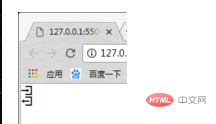
c4a6534bbad623e4e5dcd79f207ae24.png-600

注:可在上边的网站中找到使用方法,如图,由于导入的Bootstrap Font的CSS文件所以只有第四种方式是可用的,每一种方式引用的文件不一样,请配套使用
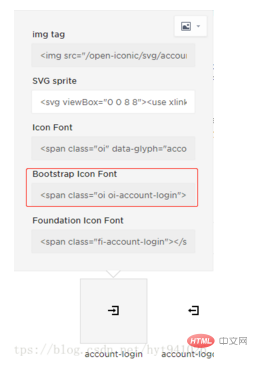
61e4fb8eea2467f2ca257386c4d94db.png-600

标签:
bootstrap4

相关文章

bootstrap如何实现table表格超过长度不显示

bootstrap实现table表格超过长度不显示的方法:可以通过text-overflow和max-width属性来实现,如【&quot;white-space&quot;: &quot;nowrap&quot;,&quot;text-overflow&quot;: &quot;ellipsis&quot;】。

在bootstrap如何将图片全屏显示

bootstrap将图片全屏显示的方法:1、使用“&lt;div class=&quot;container&quot;&gt;&lt;/div&gt;”方式;2、使用“&lt;div class=&quot;container-fiuled&quot;&gt;&lt;/div&gt;”方式。

bootstrap表格显示不出来数据怎么办

bootstrap表格显示不出来数据的解决办法:1、清理下浏览器缓存;2、修改JSON数据格式;3、修改js的bootstraptable配置。

bootstrap怎么让div水平居中

bootstrap让div水平居中的方法:首先打开相应的代码文件;然后使用“&lt;div d-flex justify-content-center&quot;&gt;&lt;div class=&quot;align-self-center&quot;&gt;”实现居中即可。

bootstrap小图标替换的方法

bootstrap小图标替换的方法:首先使用“&lt;span class=&quot;glyphicon glyphicon-search&quot; aria-hidden=&quot;true&quot;&gt;&lt;/span&gt;”;然后将glyphicon-search替换即可。

返回分类 返回首页